












- Stock: Out Of Stock
- Brand: Beats
- Model: MV712EE/A
Ask a Question About This Product
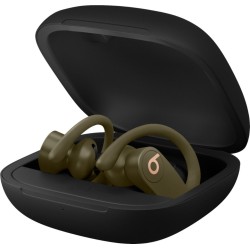
Powerbeats Pro
True Wireless High-Performance Earbuds
Surrounds you in sound
Powerbeats Pro supports spatial audio for immersive music – delivering a surround sound experience that you can take with you anywhere.1
Powerbeats Pro
True Wireless High-Performance Earbuds
Surrounds you in sound
Powerbeats Pro supports spatial audio for immersive music – delivering a surround sound experience that you can take with you anywhere.1
Long hours of training? Bring it.
Each earbud has up to 9 hours of listening time, so you can keep your music going.
With the charging case, you’ll get more than 24 hours of combined playback.2
Powerbeats Pro in the color ivory on top of an iPhone.
Powered by the Apple H1 headphone chip
And with Class 1 Bluetooth® technology, these wireless earbuds offer extended range and fewer dropouts, so they stay connected as you keep moving
Android phone displaying the Powerbeats Pro connectivity.
Compatible with iOS and Android
Powerbeats Pro easily connect to Android devices via Bluetooth® right out of the box.
With the Beats app for Android, you’ll unlock features that put you at the center of your music like never before.
Listen with a friend
With Audio Sharing, you can pair two sets of Beats headphones or AirPods to one iPhone and enjoy the same song, podcast, or movie along with a friend.
Dual audio controls
Each earbud has full volume and track controls, so you don’t need your device to adjust your music.
Powerbeats Pro showing all the different controls you have in the earbud.
Powerbeats Pro red sensor light turns on when you say "Hey Siri"
Just Ask Siri
Simply say “Hey Siri” for voice-activated assistance without having to reach for your iPhone.8
Auto Play / Pause
Optical sensors and motion accelerometers work together to detect when the earbuds are in your ear to jumpstart your workouts as soon as you’re ready to go.
Powerbeats Pro with red sensor light turned on that auto plays and pauses when the earbud is in your ear.
Black Powerbeats Pro inside open case to pair with iOS and Android.
Pairing Powerbeats Pro
iOS: With earbuds seated in the case and lid open, hold near unlocked iPhone with Bluetooth® on and full on screen instructions.
Android: Visit the Google Play store to download the Beats app. Once the app is installed, open case, and hold near android device.
Pairing to additional devices
With earbuds seated in the case and lid open, press the system button until LED blinks wait. Then choose Powerbeats Pro in the Bluetooth® menu.
Powerbeats Pro with red sensor light turned on that auto plays and pauses when the earbud is in your ear.
What’s in the box
Powerbeats Pro totally wireless earbuds
Charging Case
Eartips with four size options
Lightning to USB-A charging cable
Quick Start Guide
’b’ logo sticker
Warranty card
Long hours of training? Bring it.
Each earbud has up to 9 hours of listening time, so you can keep your music going.
With the charging case, you’ll get more than 24 hours of combined playback.2
Powerbeats Pro in the color ivory on top of an iPhone.
Powered by the Apple H1 headphone chip
And with Class 1 Bluetooth® technology, these wireless earbuds offer extended range and fewer dropouts, so they stay connected as you keep moving.
Android phone displaying the Powerbeats Pro connectivity.
Compatible with iOS and Android
Powerbeats Pro easily connect to Android devices via Bluetooth® right out of the box.
With the Beats app for Android, you’ll unlock features that put you at the center of your music like never before.
Listen with a friend
With Audio Sharing, you can pair two sets of Beats headphones or AirPods to one iPhone and enjoy the same song, podcast, or movie along with a friend.
Dual audio controls
Each earbud has full volume and track controls, so you don’t need your device to adjust your music.
Powerbeats Pro showing all the different controls you have in the earbud.
Powerbeats Pro red sensor light turns on when you say "Hey Siri"
Just Ask Siri
Simply say “Hey Siri” for voice-activated assistance without having to reach for your iPhone.8
Auto Play / Pause
Optical sensors and motion accelerometers work together to detect when the earbuds are in your ear to jumpstart your workouts as soon as you’re ready to go.
Powerbeats Pro with red sensor light turned on that auto plays and pauses when the earbud is in your ear.
Black Powerbeats Pro inside open case to pair with iOS and Android.
Pairing Powerbeats Pro
iOS: With earbuds seated in the case and lid open, hold near unlocked iPhone with Bluetooth® on and full on screen instructions.
Android: Visit the Google Play store to download the Beats app. Once the app is installed, open case, and hold near android device.
Pairing to additional devices
With earbuds seated in the case and lid open, press the system button until LED blinks wait. Then choose Powerbeats Pro in the Bluetooth® menu.
Powerbeats Pro with red sensor light turned on that auto plays and pauses when the earbud is in your ear.
What’s in the box
Powerbeats Pro totally wireless earbuds
Charging Case
Eartips with four size options
Lightning to USB-A charging cable
Quick Start Guide
’b’ logo sticker
Warranty card


